Meet customer demands with Instant Deliveries
- Pathao Commerce
- July 26, 2026
Every second matters in e-commerce. The faster a product reaches a customer after an order is placed, the more your business reputation grows.
But checking an order on your commerce platform and then copying and pasting customer details elsewhere to book a parcel can be both time-consuming and inconvenient.
To remove this hassle for merchants, the Instant Delivery option is now available directly on the Pathao Commerce platform. Now, you can arrange instant parcel deliveries directly from your Pathao Commerce dashboard.
Here is everything you need to know to get started.
Getting Started: The One-Time Onboarding
The first time you access the feature, you will be prompted to fill out a brief business information form to help us tailor our support to your needs. It covers details like:
- Your business role & product type
- Weekly order volume
- Primary service area & support requirements
If you choose to skip or close this form on your first visit, don’t worry! You can easily complete your business profile later by clicking the relevant entry point link at the top header of your dashboard.
How to Book an Instant Delivery
Once your module is ready, creating an instant order takes just a few clicks. The dashboard is designed with dynamic data entry, meaning your pickup, drop-off, and payment channels are saved after the first entry so you never have to type the same information repeatedly.
Step 1: Access the Feature
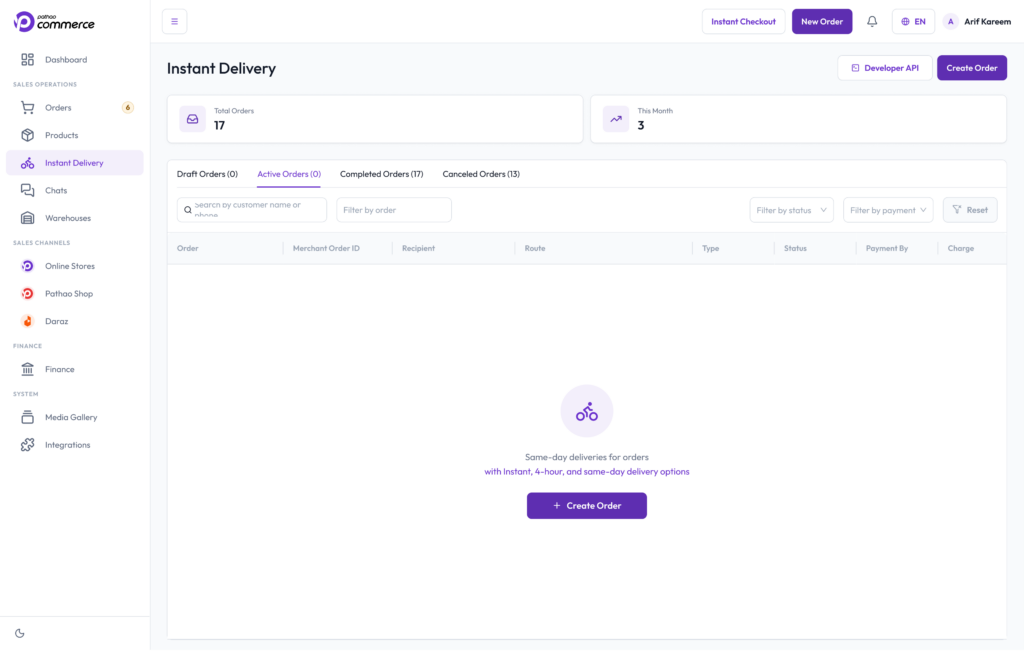
Go to the sidebar of your Pathao Commerce dashboard. Under Sales Operations, click on Instant Delivery.
Step 2: Start the Order
Click the Create Order button to bring up the Pathao Parcel form.
Step 3: Select Pickup & Product Details
Choose your pickup branch (your shop or warehouse) and add any special instructions for the rider. Input the product type, parcel size, and approximate weight. You can also upload product images here if necessary!
Step 4: Enter Customer Details
Fill in the customer’s name, phone number, full address, and specific delivery notes.
Step 5: Choose Your Delivery Type
Since this feature is built for urgency, select Instant as the delivery type. If your timeline allows a small window, you can also select the 4-Hour or Same-Day delivery tiers.
Note on Fees: Your delivery charge estimate will calculate automatically based on your pickup and drop-off points. If you change locations during creation, the estimate will refresh dynamically.
Step 6: Set Payment Responsibilities & Cash on Delivery
This is where the magic happens. Pay close attention to how you configure your payment logic:
- If the Receiver Pays (Pay on Delivery):
Select “Receiver.” If your account has collection turned on, you can enter the Amount to Collect. Once entered, a field will appear asking for the bKash number where you want your money sent. Pathao securely saves this bKash number for all future orders (though entering a new one will safely override the old one). - If Collection is Turned Off:
If Pay on Delivery collections are turned off for your profile, the amount and bKash fields will disappear, and you will see an Item Value field instead. - If the Sender Pays:
Select “Sender.” Please note that Pay on Delivery collection is unavailable when the sender covers the delivery fee. Instead, you will simply enter the Item Value for insurance and tracking purposes.
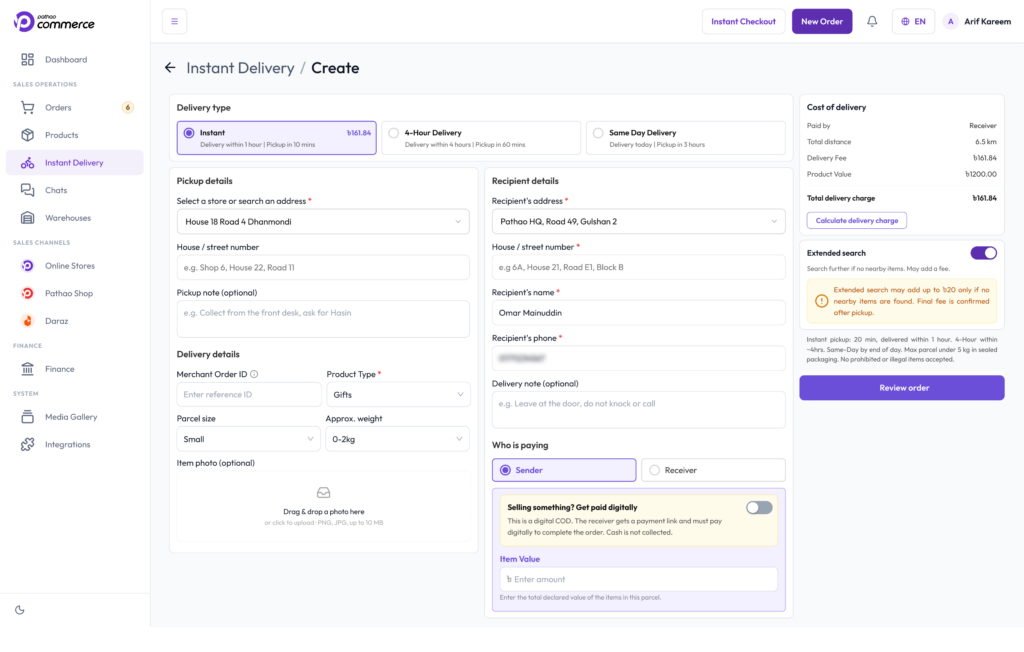
Step 7: Review & Confirm
Click Review Order to double-check the final delivery fee allocation. If everything looks good, click Confirm!
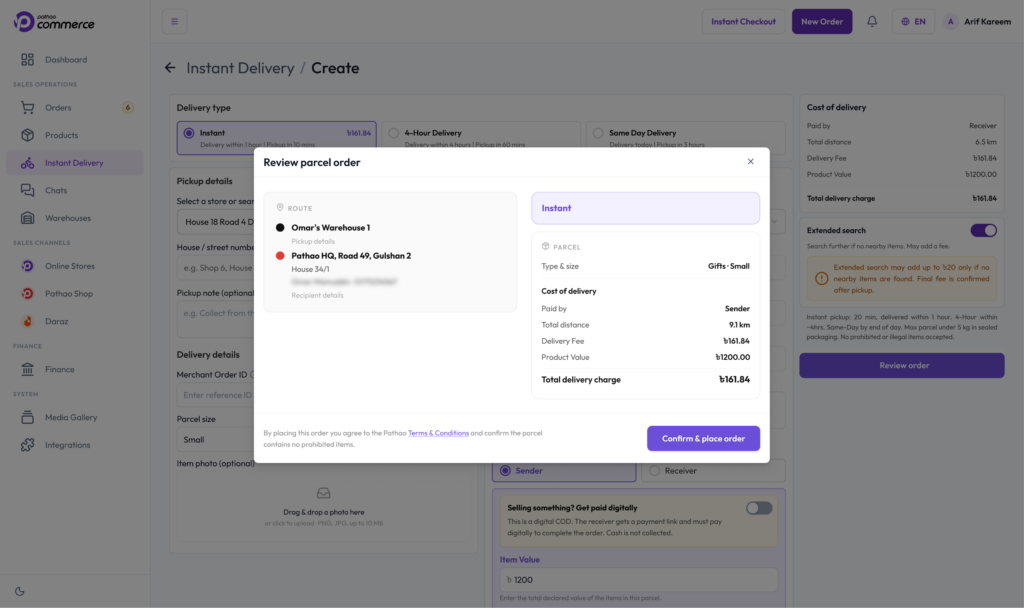
Need a wider net?
If rider availability happens to be low in your immediate area, you can toggle the Extended Search option to find riders from a wider radius. Just make sure to check if there are any minor adjustments to the delivery charge before confirming.
Live Tracking Your Orders
The second your order is confirmed, it moves into the Active Orders tab. You can sit back and monitor its entire lifecycle with real-time status updates:
- Rider Assigned: See exactly when a local rider accepts your delivery route.
- Rider Picked: Know the exact moment the rider has collected the parcel from your shop/warehouse.
- Out for Delivery: Watch the rider’s journey to the customer on a live map in real-time.
- Delivered / Cancelled: Once completed, the order automatically moves to the Delivered state, triggering our standard Pathao Parcel automated settlement flow to drop the cash right into your account. If an issue occurs, it will move to Cancelled.
Advanced: Developer API & Webhooks
Are you a high-volume merchant running a custom website or internal ERP? You don’t need to use the manual dashboard layout at all.
Pathao Commerce Instant Delivery features a robust Developer API framework. You can generate your system-to-system credentials (Client ID, Client Secret, and Access Tokens) directly from the platform.
To ensure seamless, real-time sync with your own platform, you can head over to the Webhook Integration section, input your system’s Callback URL and Secret, and hit update. Your website will instantly receive automated tracking milestones the second our riders update their apps!
A Note on Security & Support
We want to keep your store completely safe. If you ever need to contact our Customer Experience or Operations support teams to troubleshoot an API or order issue, never share sensitive credentials.
Our agents will ask for your merchant details, the API endpoint, timestamps, or error messages, but they will never ask for your password, OTP, Client Secret, Access Token, or bKash PIN. Keep these private at all times!.
What Is the Real Benefit of This Feature?
- Zero Platform Hopping: Stop copying and pasting names and phone numbers across tabs.
- Flexible Payment Operations: Smart toggles that dynamically adapt based on who is paying and whether cash collection is active.
- Developer-Friendly Tech: Full system integration via modern APIs and webhooks.
- True Speed: Real-time on-demand matching with the largest rider network in the country.
Try Instant Delivery options inside your Pathao Commerce panel today, and treat your customers to the fastest fulfillment experience on the market!